
LeetBloom technical README
Let Your Skills Bloom.
A Chromium browser extension that automatically synchronizes verified Accepted LeetCode solutions to GitHub.
JavaScript · Chromium Extensions · GitHub Git Data API · Webpack · Jasmine
Why I built it
LeetCode is where I practice problem-solving, but I wanted GitHub to be a lasting, organized record of that work. Copying each Accepted solution manually interrupted the flow, and I wanted more control over how solutions were published, tracked, and recovered when something went wrong.
Starting from LeetHub v2, I developed LeetBloom to make the workflow feel natural: solve a problem, verify that it was accepted, publish a clean GitHub commit, and keep track of the progress—without having to manage each upload myself.
What began as a personal quality-of-life improvement became a deeper engineering project involving asynchronous APIs, browser navigation, security boundaries, and consistency across GitHub and local extension state.
Meet LeetBloom
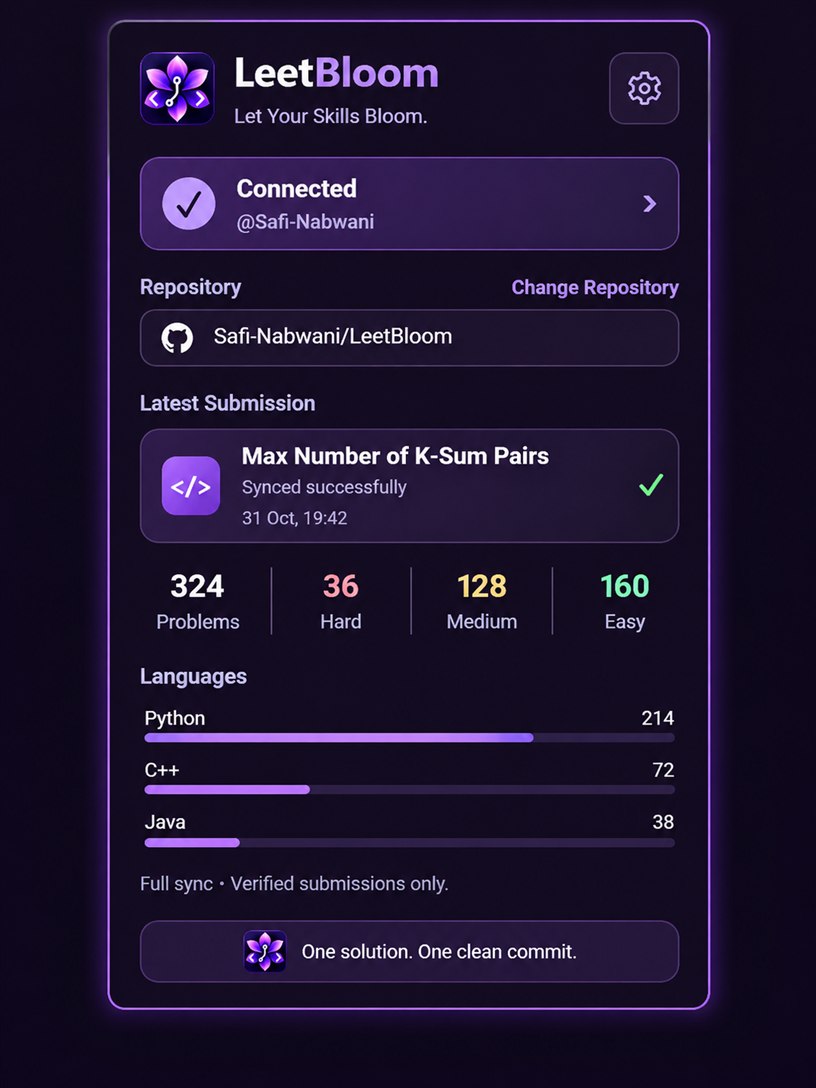
Approved popup design showcase. The 324-problem total and language counts are illustrative sample data.
The popup brings together connection status, the selected repository, the latest synchronization, a single-row Problems · Hard · Medium · Easy summary, and full-width language bars underneath. The language analytics feature counts confirmed changed synchronizations, not all historical LeetCode activity.
What it does
| Feature | Purpose |
|---|---|
| Verified Auto-Sync | Captures a submission, waits for a final Accepted result, and then publishes it. |
| One clean commit per change | Changed Accepted solutions produce a GitHub commit; identical content does not generate redundant commits. |
| Organized repositories | Maintains problem-specific solution files and preserves existing files and languages. |
| GitHub connection | Uses a fine-grained personal access token, with credential-handling kept inside the trusted extension worker. |
| Reliable recovery | Checks uncertain publication outcomes rather than assuming they failed and blindly retrying. |
| Progress dashboard | Shows repository-specific difficulty statistics, recent sync activity, and per-language bars. |
How it works
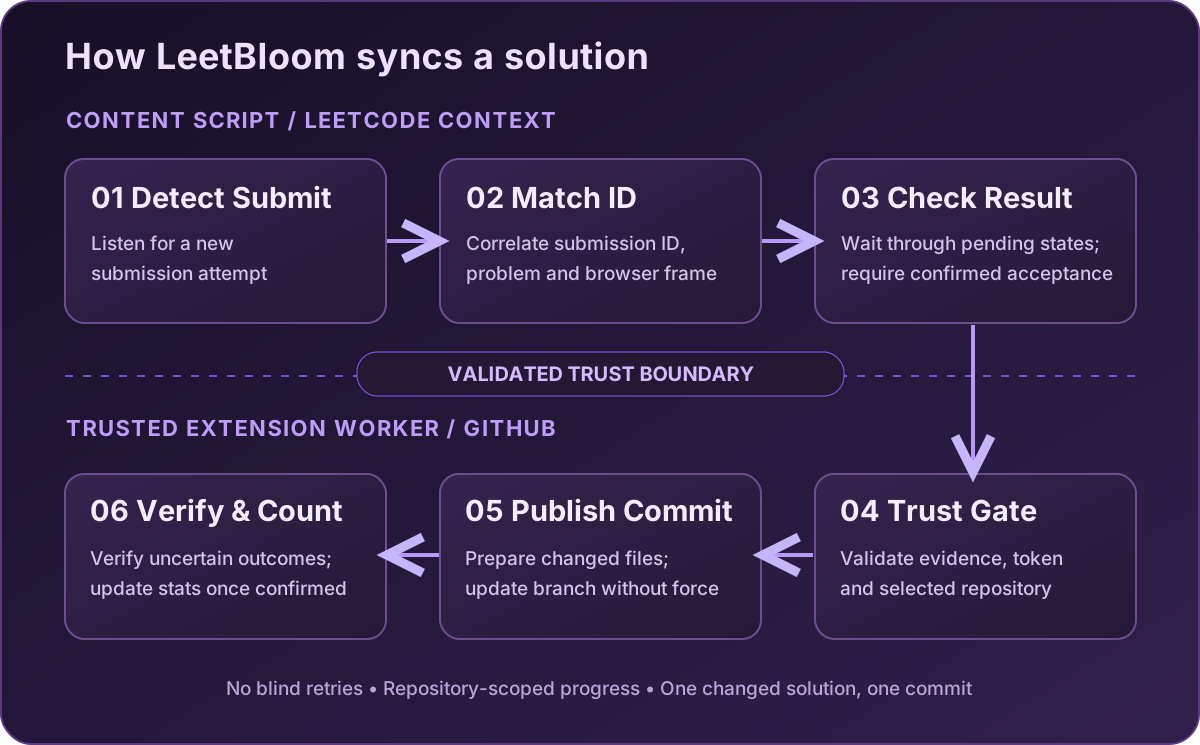
- Capture: Detect the submission and match it to the correct problem, submission ID, and navigation context.
- Verify: Account for pending judge states and require a verified final Accepted result.
- Validate: The trusted background worker checks the capture evidence, message context, and selected GitHub repository.
- Publish: Build a changed file tree and Git commit through the GitHub Git Data API, using a non-forced branch update.
- Confirm: Update statistics only when publication is confirmed; reconcile uncertain outcomes using saved evidence when possible.
The separation between LeetCode-facing scripts and the background worker is intentional: page interactions never need access to the GitHub token.
Engineering highlights
01 — Asynchronous submission results
Challenge: LeetCode judging is not instantaneous. In live testing, an intermediate status (16) appeared before the same submission ultimately became Accepted. Treating that state as a final rejection dropped a valid sync.
Approach: Use bounded follow-up checks for transient results while preserving the rule that only verified Accepted submissions may be published.
02 — Single-page navigation and identity validation
Challenge: LeetCode is a single-page application. During a legitimate submission flow, a message could retain an older /description/ URL even though the active frame had moved to the submission result. A strict URL check then rejected a valid upload.
Approach: Validate against the live browser frame and matching document identity, rather than trusting a potentially stale sender URL or weakening the submission security checks.
03 — GitHub publication recovery
Challenge: A GitHub commit may reach the repository even if the browser worker loses the success response. Repeating the upload without checking could create redundant work or inconsistent statistics.
Approach: Retain trustworthy publication checkpoints, inspect remote state when possible, and restore the confirmed sync result only when there is evidence that the commit was published. Ambiguous results are not counted as successes.
Built for dependable synchronization
- Protected credentials: GitHub authentication is confined to the extension's trusted background environment.
- Strict capture checks: Submission identity and capture evidence are required before upload.
- Safe repository writes: Non-forced ref updates and redirect rejection protect publication boundaries.
- No duplicate commits for unchanged content: Existing solutions and unrelated repository files remain intact.
- Minimal problem exports: Generated READMEs link to LeetCode rather than reproducing full problem statements.
- Contest safeguards: Auto-Sync skips identifiable contest-page contexts; historical contest origin cannot always be determined from a practice URL.
Testing & validation
The extension has been checked with Jasmine regression tests, focused UI tests, production builds, and real-browser trials. Covered scenarios include judging transitions, SPA navigation races, submission identity, token boundaries, repository selection, unchanged solutions, interrupted publication, and statistics recovery.
At the late navigation-validation checkpoint, 342 automated tests passed. Subsequent interface refinements were validated with focused tests and a production build. A real Accepted submission of Product of Array Except Self was also confirmed synchronized successfully in Opera GX, with updated popup statistics.
These are observed results from specific checkpoints, not a claim that every interruption or edge case is fully resolved.
Project scope & acknowledgments
LeetBloom is a private, personal-use project. The extension package and source repository are not publicly distributed. V1 does not import all past solutions or reconstruct historical language counts, and some interrupted attempts cannot be recovered without an existing trusted checkpoint. Its automated authenticated LeetCode access has not been established as officially permitted, and LeetBloom is not affiliated with or endorsed by LeetCode or GitHub.
Open-source foundation: LeetHub v2, itself derived from the original LeetHub. LeetBloom customizes the visual identity, popup and setup experience, GitHub credential flow, submission tracking, safe publication/recovery, statistics, and regression coverage.
LeetBloom · Let Your Skills Bloom.
Every solved problem is progress worth preserving.