Project 02 / Browser extension
LeetBloom
Let Your Skills Bloom.
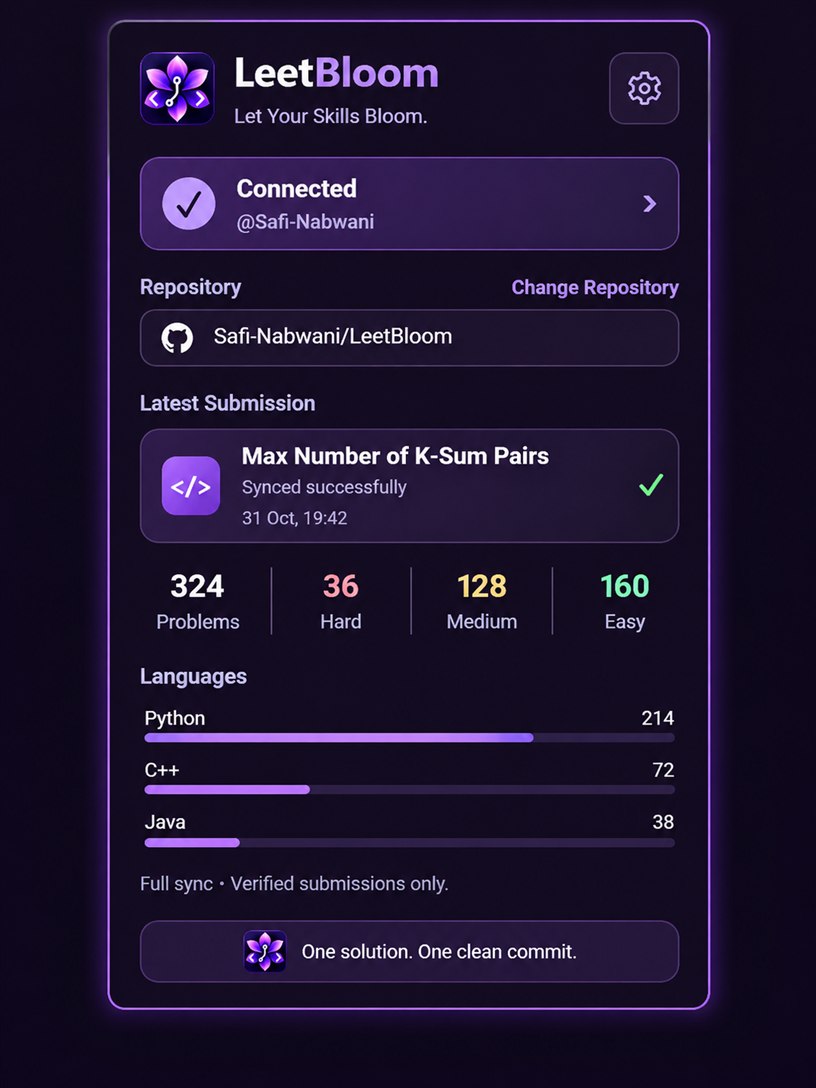
LeetBloom is a private Chromium extension that verifies Accepted LeetCode submissions and saves changed solutions to a selected GitHub repository. I built it to keep a versioned record of daily practice without copying solutions by hand.
See the product preview
Why I built it
When I started practicing on LeetCode, I wanted a way to automatically save my accepted solutions to GitHub and keep track of my progress. That's when I discovered LeetHub v2, a browser extension designed to do exactly that.
However, I quickly noticed an inefficiency: LeetHub could generate four separate Git commits for a single solved problem. What should have been one clean commit was unnecessarily cluttering my repository history.
Rather than accepting the limitation, I saw an opportunity to learn something new. I had little experience with browser extension development, but I was curious about how the extension worked and whether I could improve it.
AI played a central role in making that possible.
I began using ChatGPT not simply to generate code, but as an interactive mentor and engineering partner. It helped me understand the extension's architecture, guided me through unfamiliar JavaScript concepts, explained browser APIs and asynchronous execution, and taught me how to investigate problems systematically.
Instead of treating AI-generated code as a black box, I used our conversations to understand why changes were necessary, evaluate different approaches, and learn from the bugs and unexpected behavior we encountered. AI-assisted development tools then helped turn those decisions into implementations that I could test and refine.
My initial objective was straightforward: one accepted solution, one meaningful Git commit. But solving that problem exposed deeper challenges involving submission verification, browser navigation, GitHub API interactions, security boundaries, and recovery from uncertain publication outcomes.
Over time, what began as a small optimization evolved into LeetBloom, a substantially customized extension with improved reliability, security, progress tracking, and user experience.
More importantly, the project changed how I approach technology. AI became more than a tool for producing code — it became a way to accelerate my learning, explore unfamiliar systems, and develop the confidence to improve software I use every day.
LeetBloom represents that philosophy: combining curiosity, engineering judgment, hands-on experimentation, and AI-assisted learning to turn an everyday frustration into a meaningful software project.
01 / Product preview
LeetBloom Interface
02 / Features
What LeetBloom does
Automatic synchronization
Tracks submitted solutions and waits for a verified Accepted result before sending a change to GitHub.
GitHub integration
Publishes changed solutions to the selected repository in one commit. Identical submissions are skipped, and existing language variants are preserved.
Publication recovery
Checks remote branch and commit state when an upload result is uncertain. Work remains unresolved when publication cannot be proven.
Credential isolation
Keeps the fine-grained GitHub token in the trusted extension background context, separate from LeetCode page scripts.
Language analytics
Shows a per-repository breakdown by language using confirmed synchronizations of changed solutions.
03 / Architecture
From Submit to confirmed publication
Capture
The content script associates the Submit action with the problem and submission ID.
Verify
The content script waits for Accepted. The background worker checks the capture and repository context.
Publish
Changed files go through the Git Data API with a non-forced branch update.
Update statistics
Confirmed publication updates the selected repository’s progress and language counts.
04 / Engineering
Three challenges in the sync workflow
Asynchronous submission verification
During a live investigation, LeetCode returned judging status 16 before the same submission became Accepted. Treating that status as a final rejection ended the sync too early. The corrected flow keeps checking within a bounded window and requires verified acceptance before publication.
Single-page navigation and identity
After navigation within LeetCode, a valid submission could arrive with the sender’s older /description/ URL. Strict validation returned InvalidMessage. The background worker now verifies the current browser frame and matching document identity so the upload can proceed when that context is valid.
GitHub publication recovery
GitHub can receive a commit even if the extension loses the success response. A blind retry can duplicate work. LeetBloom retains bounded capture and publication evidence, checks remote branch and commit state when possible, and updates repository statistics only when publication can be proven.
05 / Technical summary
Stack, verification, and attribution
Implementation
JavaScript and Chromium Manifest V3, with Webpack for bundling, the GitHub Git Data API for publication, and Jasmine for regression testing.
Project foundation
LeetBloom is a private customization of LeetHub v2, which builds on the original LeetHub.
Automated regression tests
The project handoff records 342 passing Jasmine tests at the single-page navigation correction checkpoint. Coverage included pending and rejected submissions, navigation races, credential and repository boundaries, duplicate prevention, and recovery. Later UI changes were checked separately.
Browser observation
An Accepted Product of Array Except Self submission synced in Opera GX and updated the popup.
06 / Resources
Project materials
-
Technical README
Read the implementation walkthrough, testing evidence, and project scope.
-
PowerPoint presentation
An eight-slide walkthrough of LeetBloom’s workflow and engineering.